

CALL US SATURDAYS
9 am – 11 am Pacific
775-241-3571
Click for More Info
- Advertising Setting
- Mint editions
- Won’t Print 1997
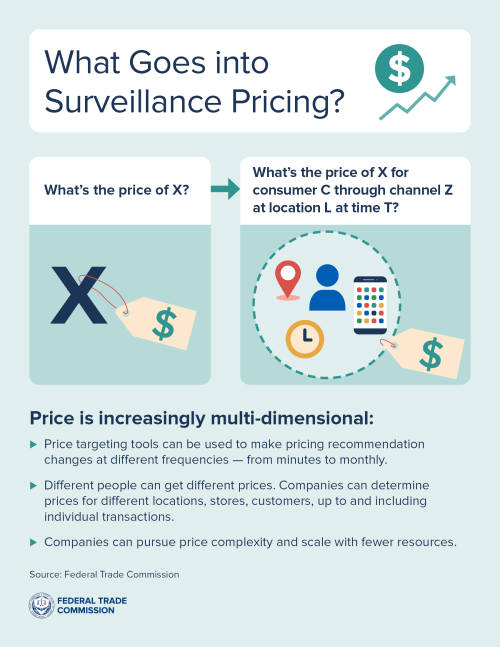
- FTC Surveillance Pricing
- Surveillance Pricing
- Window 10 Oct 2027
- Say GNOME
- Minority Report
- bbtl.ink/stats for more links

 Breakmaster Cylinder composed and performs our theme music.







Carson City Linux User Group – Meeting third Saturdays at ComputerCorps in Carson City – carsoncitylinux.org

One on One Tech Help at the Carson City Library Wednesdays 3-4 pm Techbusters
Why Can’t I Just Find What I’m Looking For?
This week on Battle Born Tech we welcome Steven and Lee. Steve is looking for his storage drive on a Linux machine and Lee can’t find his printer after the WiFi changes. . Christy has an extended explainer (okay, rant) about what surveillance pricing is and how to find the best prices by evading it.
Want to update your programs on your schedule? Use the Terminal (Admin) command line by right clicking on the Windows icon:
winget update –all –include-unknown
with a space between winget and update and before the double dashes.
Information About Your System
Windows Click Start, then Settings, then System, then About. Your drive size shows up under Device Specifications, alongside your processor and memory.
Mac Click the Apple menu in the top left corner, then About This Mac, then Storage. You’ll see your total drive capacity right there, along with a breakdown of what’s using it.
Linux Open your Settings app and look for an About panel, most desktop versions of Linux have one, similar to Windows
Quick recommendation Linux Disks
- Just want to check free space fast →
df -hin terminal, or open the Disks app - Want a visual, no-typing option → Disks app from the menu
- Troubleshooting or scripting →
lsblkanddf -hare the most commonly used
Lee added a question about PDF. We should have said that Print and Export (or Save As) PDF create different types of PDF files. The Print option is a picture of the document, it doesn’t preserve the text as text, so the text is not searchable and you can’t select it to copy and paste as text. OCR is needed to get the text out of such PDFs.
We are in the studio Saturdays 9 am to 11 am Pacific. Call direct to studio then or anytime at 775-241-3571 and set up a time to battle your tech!
“ABCs of USB”
“Always yelling at me to update!”
“Windows 10 got another breath of life”
“Let’s see how fast I can type into Google.”
“Already on your way to Linux Land”
“I’m waiting for Anthony to text me a correction.”
“Definitely over simplified, but not wrong” – (Text from Anthony)
“Kinda of something NOT to know anymore.”
“Sure, keep it secret.”
“Should have looked for that sticker”
“Don’t know which place to bang on.”
“You change one part and other parts don’t work. That’s what a system is all about.”
“Wait until it tells you: Okay plug in the cable.”
“Tell them Battle Born Tech is your favorite music.”
Some items of this page and show notes were created with the assistance of AI to make Christy understandable to humans.
BATTLE PLANS
with help from Claude.ai
TRIM
Not an acronym, just a command name written in capitals. It’s how your computer tells a solid-state drive which deleted files’ space is safe to actually erase, which keeps the drive running fast instead of slowing down as it fills up.
RAID (Redundant Array of Independent Disks)
A way of combining multiple hard drives so they work together, either to speed up your computer or to protect your data if one drive fails. Think of it as a safety net built from spare parts. (Yes, the “I” used to be INEXPENSIVE disks.)
GNU (GNU’s Not Unix)
A collection of free, open-source software tools that anyone can use, share, and modify. It’s the foundation many Linux systems are built on top of, which is why you’ll often see it written as “GNU/Linux.”
Gnome (GNU Network Object Model Environment)
One of the most common desktop environments for Linux, meaning the visual layout you see and click on, your icons, menus, and windows. The name started as a real acronym but has outlived its original technical meaning, much like RAID.
Package Manager
It’s a tool that finds, installs, and updates software for you automatically, similar to an app store, saving you from hunting down programs one at a time and manually keeping each one current. On Windows, this comes built in as WinGet, Microsoft’s own command line package manager, available on Windows 10 and Windows 11.
SSID (Service Set Identifier)
The name your Wi-Fi network shows up as when you search for available networks on your phone or computer. It’s simply the label, not the password.
OCR (Optical Character Recognition)
Technology that looks at a scanned image or photo of text and converts it into real, selectable words a computer can search and copy.
Tuesdays 8 PM Pacific 95.1 FM Carson City, Nevada
Streaming LIVE on at KNVC.ORG

775-241-3571 or [email protected]