
Battle Born Tech
Battle Born Tech
Bot Friday
Loading
/

Bot Friday

This week on Battle Born Tech℠, the bots are everywhere. Rachel sets up her daughter’s first laptop, Hallie wrestles a WordPress home page that won’t let her edit it, and Rachel calls back after losing the toy race to the shopping bots again.

Rachel is starting her 11-year-old on a Chromebook, picking up where her mom left off on last week’s show. Christy walks through Google Family Link: screen time limits, an allowlist of approved sites, guest mode turned off, and why the laptop belongs in the dining room. Joe adds a warning for parents about AI chatbots.

Hallie can change every page on her WordPress site except the one that matters. Christy explains why the home page isn’t really a page at all, how themes, widgets, and plugins divide up the work, and whether WordPress is still worth learning now that AI can build a site for you.

Rachel calls back after a dozen auto-buy alerts for a viral squishy toy all came up empty. Christy explains what auto-buy is actually for, and why a toy that sells out in seconds is probably being bought by software, not people. He timed one himself: gone in 42 seconds.

Also this week: why the website you control still beats a page on someone else’s platform, and why anyone who lets AI edit a website needs a backup the AI can’t reach.


BATTLE SCARS
Corrections

Our Ex-Post Facto Checker Anthony keeps us honest. Here’s what we fixed, tightened, or explained after the show.

Corrections

1. Black Friday, not Good Friday. In the opener, Christy invited calls about beating the bots at “Good Friday” sales. He meant Black Friday. Forty years in the pulpit will do that to a man.

2. CMS stands for content management system, not contact management system. That’s software like WordPress, which stores your site’s words and pictures in a database and builds the pages for you.

Clarifications

3. Do embedded YouTube videos get past a block? It depends on the blocker. Christy warned that a YouTube video embedded on another site might still play even after you block YouTube. That’s true for some tools. Parents report that some browser extensions and phone screen-time settings let embedded videos through, for example by watching them from a search results page. Filters that work at the network level, like a home router or a business firewall, generally block embedded videos along with youtube.com. In fact, network administrators who try to block YouTube but allow embeds say they can’t. We haven’t tested Family Link’s site blocking against embedded videos. One more gap: sites can also embed YouTube videos from a second address, youtube-nocookie.com, and the YouTube app is separate from the website. To shut YouTube off on a supervised device, block both youtube.com and youtube-nocookie.com in Family Link’s site settings, and block the YouTube app in Family Link’s app controls. If you need a sure thing, a filter on your router covers every device and every site.

4. Gemini for kids under 13 is off until a parent turns it on. Christy said the AI “stays off” for kids under 13. That’s the starting point, but a parent can switch it on in Family Link. If you do, Common Sense Media recommends close supervision (linked in Battle Fields).

5. Googlebook doesn’t make your Chromebook obsolete. Googlebook (one word) is Google’s new, higher-priced laptop line. It went on sale in October 2026 at prices under $1,000. Google is still making Chromebooks, and says many newer models will be able to upgrade.

Explanations

6. Kids can no longer drop supervision on their own at 13. Christy got this right on air. Under Google’s current rules, anyone under 18 needs a parent’s approval to stop Family Link supervision, and both parent and child are notified when it stops.

7. Why turn off guest mode, and who can do it. Guest mode lets anyone use a Chromebook without signing in, and parental controls don’t apply there. Only the Chromebook’s owner can turn it off. The owner is the first account that ever signed in, so the parent should be the one to set the laptop up. In the same settings, turn on “Restrict sign-in” so no one can add a new, unsupervised account.

8. Allowlist vs. blocklist. A blocklist lets everything through except the sites you list, which means endless whack-a-mole. An allowlist opens only the sites you approve. In Family Link that setting is called “Only allow approved sites,” and your child can send you a request for any site they want added.

9. Your WordPress menus depend on your theme’s age. Hallie’s site uses an older “classic” theme, so Christy’s directions fit: Appearance, then Customize, and widgets. Many newer “block” themes don’t have the Customize menu. They use Appearance, then Editor, where you arrange blocks instead of widgets. If you can’t find Customize, you probably have a newer theme.

10. Most WordPress security holes are in plugins. Security researchers have found year after year that over 90% of newly reported WordPress security holes are in plugins, not WordPress itself. Install only the plugins you need, keep them updated, and delete the ones you don’t use.

11. Why Auto Buy can’t win the toy race. Christy figured Auto Buy checks prices about every 30 minutes, and that’s right: Amazon’s help page says each Auto Buy item is evaluated roughly every 30 minutes. That works well for waiting out a price drop. It doesn’t stand a chance against a toy that sells out in seconds. Christy timed one drop himself, and the item was gone in 42 seconds.

12. Why Rachel had a dozen Auto Buys running. Each Auto Buy watches a single product. The toy Rachel wants comes in a whole family of figures with the same squishy theme, so she set an Auto Buy for each figure. More Auto Buys means more chances that one of those 30-minute checks lands while stock is still there, but it’s still a long shot.

13. “Shoulder surfing,” the friendly version. On the show, Christy used it to mean a parent glancing over to see what’s on the kid’s screen. In security talk it usually means a stranger peeking at your screen to steal a password. At home, it’s good parenting.

14. Why AI chatbots worry us for kids. Joe’s warning reflects a known weakness: chatbots tend to agree with whatever the user says. A grown-up may notice that. A child may not. Keep any chatbot use out in the open, the same as the laptop.


AI-assisted: Claude AI drafted this page from the show transcript and checked facts against the linked sources. Christy Ramsey reviewed it and is responsible for this site’s content.
 

Battle Born Tech℠,
where the Wi-Fi is strong,
the fonts are good-looking, and the passwords are above average.

BATTLE PLANS
by Claude.ai, checked by Christy


Chromebook

A low-cost laptop that does most of its work in the Chrome browser. Common in schools.

Googlebook

Google’s new, pricier laptop line, built on Android and Chromebook technology with Gemini AI at the center. It went on sale in October 2026. Chromebooks are still being made, and some newer ones can upgrade.

Family Link

Google’s free parental-control app. A parent uses it to manage a child’s Google account and devices.

Supervised Account

A child’s Google account that a parent manages through Family Link.

Allowlist / Blocklist

An allowlist means only the sites a parent approves will open. A blocklist means everything opens except the sites on the list.

Guest Mode

A Chromebook sign-in that needs no account. Parental controls don’t apply to it, so turn it off.

Incognito Mode

Private browsing that doesn’t save history. Family Link turns it off for supervised accounts.

SafeSearch

A Google setting that filters explicit results out of searches.

Gemini

Google’s AI chatbot.

Laptop Lock Slot

The small slot on many laptops for a cable lock, like a bike lock for your computer. Often called a Kensington slot.

Router-Level Filtering

Blocking sites at your home internet box, so the block covers every device in the house. Phones not on wifi using cell data by-pass this.

youtube-nocookie.com

YouTube’s second web address, used when a website embeds a video in “privacy-enhanced mode.” Blocking only youtube.com can leave these videos playing, so block both addresses, plus the YouTube app.

WordPress

Free software that runs a large share of the world’s websites.

CMS (Content Management System)

Software that stores your site’s content in a database and builds the pages for you, so you can edit without writing code.

PHP

The programming language WordPress uses to assemble a page each time someone visits.

Static Page

A page that stays the same until someone edits it, as opposed to one built fresh from a database on every visit.

Theme

The design package that controls how a whole WordPress site looks. One per site.

Plugin

An add-on that gives WordPress a new ability, like emailing you when someone leaves a comment. Plugins are also where most WordPress security holes turn up.

Widget

A content box you place in an area of a page, such as a sidebar, a photo, or a list of recent posts.

Customizer / Site Editor

The two places WordPress gives you to change a site’s design. Older (classic) themes use Appearance, then Customize. Newer (block) themes use Appearance, then Editor.

Cache

A saved copy of a page that loads faster. It can keep showing you the old version after you’ve made a change.

Hosted Site Builder

A service like Wix, Squarespace, or Google Sites that runs the website for you.

AI Website Builder

A tool that builds a site from a plain description of what you want.

Offline Backup

A copy of your files kept somewhere that’s disconnected, where neither a hacker nor an AI can change it.

Auto Buy

A store feature that buys an item for you automatically when its price drops to a number you set.

Agentic AI

AI that takes actions for you, such as completing a purchase, rather than just answering questions.

Grinch Bot

Software that buys up hot holiday items the moment they appear, usually to resell at a markup.

CompuServe ID

Your account number on CompuServe, one of the first big online services (1980s and 1990s). It was a string of digits with a comma in it, and somehow everyone who had one still remembers it.

DBAN “Autonuke”

DBAN is a free tool that erases hard drives. Its autonuke option wipes every drive it finds without asking first. That’s why Anthony knows not to make it the default.

Shoulder Surfing

As Christy uses it, a parent watching what’s on the kid’s screen. In security talk it usually means a stranger peeking at your screen to steal a password, so this is the friendly version.

“Gone in 42 Seconds”

Joe’s nod to the Nicolas Cage movie Gone in 60 Seconds (2000).


CALL US

Saturday 9 am – 11 am Pacific
Sunday 7 pm – 9 pm Pacific

775-241-3571

BATTLE FIELDS
Click for more info

BATTLE CRIES
I have not yet begun to quip

“There’s no substitute for parenting.”

“Don’t let the child get the parent password.”

“There’s no there there. You can’t go edit that page.”

“You almost need a professional driver’s license to use it.”

“No matter how you make it, make sure it’s your own.”

“Always make sure you have an offline secure backup that AI can’t get to.”

“I’m clicking so fast. You’ve never seen it click so fast.”

“At one point, the AI was tired.”

“Rachel Intelligence. RI wins out for once.”

“Kids are smarter than you give them credit for.”

“If we can’t do it, we ask Claude.”

“Let’s build another data center.”



Letters KNVC 95.1 FM Logo


Breakmaster Cylinder composed and performs our theme music.



Carson City Linux User Group – Meeting third Saturdays at ComputerCorps in Carson City – carsoncitylinux.org 


One on One Tech Help at the Carson City Library Wednesdays 3-4 pm Techbusters
 

We are often in the studio Saturdays 9 am to 11 am and Sundays 7 pm to 9 pm Pacific. Have your smart phone or speaker remind you to call! Call direct to studio then or anytime at 775-241-3571 and set up a time to battle your tech!

Tuesdays 8 PM Pacific 95.1 FM Carson City, Nevada

Streaming at KNVC.ORG

Battle Born Tech℠ is a
Registered
Service Mark of Christy Ramsey

775-241-3571 or [email protected]

Battle Born Tech
Battle Born Tech
Holes in the Internet
Loading
/

Holes in the Internet

This week on Battle Born Tech℠ we recruit Bette, Scott, and Brian to the battle. Things either get through when they shouldn’t or won’t get through when they should: a grandchild who could get loose on the internet, an email a spam filter slammed shut, and a fax that can’t whistle over an internet phone line. Plus the week Microsoft email and the nation’s air traffic system both went down.

Bette wants to give her 11-year-old granddaughter an iPad or computer without setting her loose on the internet. We walk through the built-in parental controls: Microsoft Family Safety for Windows, Screen Time and Family Sharing for Apple, and Family Link for Android, plus why a computer in the family room may beat any setting. The settings help, but they can fail, and one app held back its own safety feature as a test. Nothing replaces knowing what your kid is watching and talking with them about it. If someone you love is struggling, call or text 988, the Suicide and Crisis Lifeline.

Scott’s emails to a software vendor he has worked with for years started bouncing back with “550 permanent failure, blocked” from the vendor’s Barracuda spam filter. AN ALL-CAPS SUBJECT LINE plus talk of payments and invoices looks, to a robot, a lot like invoice fraud. The fix is a phone call: ask the vendor to put your whole email domain on their allowlist. And keep subject lines friendly and in lowercase.

When Microsoft email went down, Brian dusted off his fax machine, but it won’t work on his internet phone line. Fax tones get chopped up in internet packets. Make the fax dumber: slow it to 9600, turn off Super G3 and error correction mode, and ask your phone company for T.38 fax relay or a G.711 line. Or skip the phone line and use an online fax service.

In the news: the Microsoft Outlook and Microsoft 365 outage on November 12 and 13, traced to a network capacity upgrade, and the FAA’s nationwide ground stop on November 13, when a new router at a remote site flooded the old air traffic communications network. Hanlon’s Razor says don’t blame malice for what mistakes explain. Grey’s Law says big enough mistakes look the same.

BATTLE SCARS
Corrections

From this episode: Microsoft Family Safety: the piece being retired is the Family Safety app on Windows, not the website. Sign-up pushes you to the phone app, the easiest way to run it, and Microsoft says organizers can also use account.microsoft.com/family. When web filtering is on, Family Safety blocks other browsers for you, since its filters work only in Edge. If the gift is an iPad, Apple’s Screen Time is the main tool.

Apple’s redesigned parental controls need iOS 27 on every device in the family group, but the older Screen Time keeps working if you can’t update them all. Enter your child’s real birth date; age-based protections depend on it. The router is the box that connects your home to the internet, not a box on your computer, and a guest network separates devices but doesn’t block anything by itself.

The safety test, more precisely: a video app held back a new safeguard from a test group of about 15 million US users. One 16-year-old in that group watched 7,563 videos in the last two weeks of his life, about three quarters centered on sadness and struggle. It came to light in an internal report covered by Bloomberg, and his parents have sued.

For Scott: all capital letters in a subject line is a classic spam signal. We put it too broadly on air; it says nothing about who wrote the message. The bounce itself didn’t say why the message was blocked, so all caps and payment talk are a strong guess. “Permanent” means that message; a different one may get through later. The bounce came Monday at 11:06 in the morning, not at night. And no unauthorized charge: Scott’s annual auto-renewal went through as expected; what was missing was the invoice and receipt. A tip: an email asking whether invoices should go to a different address looks like invoice fraud to a filter, so ask that one by phone. Before pasting a bounce into an AI, blank out addresses and account numbers.

For Brian: advice on error correction mode varies. Slow speed with ECM off is the common fix for an internet phone line, but some T.38 providers recommend 14,400 with ECM on, so ask yours. A fax service you upload to in a web browser doesn’t depend on your email provider; emailing a fax to the service does.

On the outages: the FAA says its legacy equipment became unstable from a flood of connection attempts traced to sites where a new router was being installed. Copper wiring wasn’t the cause, and no fiber was jammed into anything. Microsoft blamed a problem from an earlier network capacity upgrade that surfaced after a later network change. Neither explanation mentions staffing, so the idea that companies let go of the people who knew how things worked is our opinion. And the fiber-into-a-serial-port numbers were illustrations: one gigabit against a 115,200 bps serial port is about 8,700 to one, less likely combination  of speeds of the connection can go up to 8 million to one.

AI-assisted: Claude AI drafted this page from the show transcript and checked facts against the linked sources. Christy Ramsey reviewed it and is responsible for this site’s content.
 

988 Suicide and Crisis Lifeline

Struggling, or worried about someone? Call or text 988, any time.

Call 988 · Text 988 · 988lifeline.org

Battle Born Tech℠,
where the Wi-Fi is strong,
the fonts are good-looking, and the passwords are above average.

BATTLE PLANS
by Claude.ai,
checked by Christy


Parental Controls

Built-in tools that let a parent set limits through a supervised child account. Microsoft Family Safety covers Windows, Xbox, and Android; Apple uses Screen Time and Family Sharing; Google uses Family Link for Android and Chromebooks.

Router and Guest Network

The router is the box that connects your home to the internet and runs your Wi-Fi. A guest network is a separate Wi-Fi network for visitors, kept apart from your main devices.

VPN

Virtual private network: a tunnel that hides where your internet traffic goes, which can also slip it past filters.

Algorithm

The rules an app uses to pick what to show you next, usually based on what you already clicked and watched.

Spam Filter

A service that checks incoming mail before it reaches the inbox and turns away what looks like junk. Barracuda is a popular one.

Bounce and 550 Error

A bounce is the automatic “couldn’t deliver” email you get back. A 550 is a permanent refusal of that message, so don’t keep resending it unchanged.

Headers

The hidden routing details attached to every email, like postmarks on an envelope.

DKIM, SPF, and DMARC

Email ID checks that prove a message really came from your domain.

Allowlist

A list of senders a filter always lets through.

Blocklist

The opposite of an allowlist: a list of senders or websites a filter always turns away. Spam services also share blocklists of senders with bad reputations.

Invoice Fraud

A scam email posing as a real vendor’s bill or asking to send payments somewhere new.

Analog vs. VoIP Line

An analog (copper) line carries the actual sound. A VoIP (internet phone) line chops your voice into data packets and sends them over the internet.

Group 3 and Super G3

Fax standards. Super G3 is the fast mode that chokes on internet phone lines; 9600 bps is the slower, sturdier speed.

ECM

Error Correction Mode: a fax setting that resends damaged parts of a page.

T.38 Fax Relay

A standard that turns fax tones into data so they survive the trip across the internet.

G.711 and Codecs

A codec is how a phone system squeezes and unsqueezes sound. G.711 is uncompressed, closest to an old phone line.

Online Fax Service

A website or app that sends and receives faxes for you, no fax machine needed.

Tier Two Support

The more experienced technicians behind the first person who answers the help line. If the first person sounds puzzled, politely ask, “Is there someone else I can talk to about this?”

RS-232 Port

An old, slow serial connector once used for modems and equipment.

Exchange Online

The Microsoft service that runs Outlook email for businesses.

Ground Stop

An FAA order holding departing flights on the ground.

Institutional Knowledge

The know-how that lives in people’s heads instead of the manuals: why a system was built the way it was and which quirks to work around. When experienced people leave without passing it on, it walks out the door with them.

Hanlon’s Razor

“Never attribute to malice that which is adequately explained by stupidity.” Before blaming a villain, check whether someone simply made a mistake. First printed in Arthur Bloch’s Murphy’s Law Book Two (1980), credited to a Robert J. Hanlon, whoever he was.

Grey’s Law

“Any sufficiently advanced incompetence is indistinguishable from malice.” The flip side of Hanlon’s Razor: a big enough mistake hurts as much as sabotage. A play on Arthur C. Clarke’s line about technology and magic. Nobody knows who Grey was.

The Singularity

A predicted moment when artificial intelligence outthinks people and improves itself so fast that the future becomes impossible to predict. Science fiction writer Vernor Vinge popularized the idea in 1993, and futurist Ray Kurzweil made it famous. It is a prediction, not a fact, and experts disagree on whether or when it could happen.


CALL US

Saturday 9 am – 11 am Pacific
Sunday 7 pm – 9 pm Pacific

775-241-3571

BATTLE FIELDS
Click for more info

BATTLE CRIES
I have not yet begun to quip

“It’s more about talking and supervision than about technology.”

“AI can be wrong, and AI is not your friend.”

“Nothing replaces you knowing what your kid is watching and talking with them about it.”

“I was wanting to give her an iPad, but I don’t want her loose on the internet.”

“The algorithm feeds me what I’m clicking on.”

“Keep it clean by watching dog videos.”

“It was almost like a restraining order in the email world.”

“You got to call the vendor to call off the fighting fish.”

“I will stop wasting time on my end and go right to the source.”

“You got to make your fax machine dumber.”

“There’s something to be said about taking the paper here, putting it in the machine, and paper comes out over there.”

“Sufficiently advanced incompetence is indistinguishable from malice.”

“If it’s everybody, well, that’s a whole different kettle of fish. Not always a barracuda.”

“That’s why we need humans in the loop.”

“All capitals in emails is like shouting indoors.”

“Do you got your magic word pad out?”


Letters KNVC 95.1 FM Logo


Breakmaster Cylinder composed and performs our theme music.



Carson City Linux User Group – Meeting third Saturdays at ComputerCorps in Carson City – carsoncitylinux.org 


One on One Tech Help at the Carson City Library Wednesdays 3-4 pm Techbusters
 

Speaking of barracudas: Heart, “Barracuda” (1977).

We are often in the studio Saturdays 9 am to 11 am and Sundays 7 pm to 9 pm Pacific. Have your smart phone or speaker remind you to call! Call direct to studio then or anytime at 775-241-3571 and set up a time to battle your tech!

Tuesdays 8 PM Pacific 95.1 FM Carson City, Nevada

Streaming at KNVC.ORG

Battle Born Tech℠ is a
Registered
Service Mark of Christy Ramsey

775-241-3571 or [email protected]

Battle Born Tech
Battle Born Tech
Don’t Let Sleeping Laptops Die
Loading
/

Don’t Let Sleeping Laptops Die

This week on Battle Born Tech℠ we recruit Pete, Brian, and Mike to the battle. A laptop that slept itself to death on a trip, a thrift-store pile of wireless keyboards that may not talk to each other, and a Windows 11 upgrade that turned a happy laptop into a slow one. Plus an urgent Chrome update, and the man who wrote Windows Task Manager is back with a new one.

Pete’s Dell laptop was sleeping in standby on a trip until the battery ran out. When he charged it, it came back saying it couldn’t boot: “inaccessible boot device.” When a Dell loses all power, its built-in startup settings (the BIOS) can reset to factory defaults, and that can change how the computer talks to its own drive, so Windows can’t find itself. We cover how to set it back, why sleep is hard on a laptop you only use now and then, and how to keep it from happening again.

Brian wants to clear the cords off his desk with a thrift-store wireless keyboard and mouse. Can he grab any keyboard and any dongle? Probably not. We sort out what works with what: Bluetooth, Logitech’s orange-star Unifying receivers, and the newer green Logi Bolt receivers, and why a cheap wired mouse still belongs in your drawer.

Mike’s Dell Inspiron 5570 ran Windows 10 just fine. Windows 11 went on after a fight over disk space, and now everything is slow. We work through the usual suspects: memory (RAM), the kind of drive inside, a third-party antivirus, programs hiding in the system tray, and BitLocker encryption.

In the news: Google patched Chrome’s eighth actively exploited zero-day of 2026. Update tonight: click the three dots in the upper right, then Help, then About Google Chrome, and click Relaunch. Edge, Brave, Opera, and other Chromium browsers get their own updates. And Dave Plummer, who wrote the original Windows Task Manager, has a new one called TMOG for Windows, Mac, and Linux. Its own banner asks Mike’s question: “Why is my computer slow?” The free version shows what is running right now; Pro, a one-time purchase under $50, can record a slowdown so you can replay it later. Download it only from tmog.org.

BATTLE SCARS
Corrections

From this episode: The Chrome menu is the three dots in the upper right, not the upper left. The fixed version is Chrome 157.0.8103.50 or later. In Edge, click the three dots, then Help and feedback, then About Microsoft Edge.

On Pete’s Dell, the setting is AHCI (not “ACHI”). Dell says Windows has to use the same storage mode it was installed with, and Dell’s default is RAID On. So the fix is to set it back to whatever it was before the reset. If AHCI won’t boot, switch back to RAID On. Switching back and forth does not erase anything.

Fast Startup is a partial hibernate, not sleep, and it doesn’t drain the battery while the laptop is off. Turning it off is still good advice, for a different reason: with Fast Startup on, Shut down isn’t a full shutdown, so Windows never gets a truly fresh start. (Restart always does a full start.) Pete’s battery drain came from standby (sleep). Also, a fresh CMOS coin battery usually holds BIOS settings for years, not weeks.

On Brian’s receivers: Logi Bolt receivers plug into USB-A. (There is a USB-C version.) Logitech has retired its old Unifying Software in favor of Logi Options+ which is used to set up its products. Bluetooth shares the 2.4 GHz band with microwave ovens too. Bolt and Bluetooth handle interference better, but they aren’t immune.

The screens at risk of burn-in today are OLED screens, not LED. And Amazon’s satellite Wi-Fi isn’t on planes yet: JetBlue expects it starting in 2027 and Delta in 2028.

For Mike: if your laptop still has a spinning hard drive, swapping in an SSD is the biggest speed upgrade you can make. Task Manager, Performance, Disk shows “SSD” or “HDD.” And before turning BitLocker on or off, save your recovery key.

AI assisted to make us sound more human.
 

Battle Born Tech℠,
where the Wi-Fi is strong,
the fonts are good-looking, and the passwords are above average.

BATTLE PLANS
with help from Claude.ai


Inaccessible Boot Device

A Windows blue-screen error that means “I can’t reach the drive I start from.”

BIOS / UEFI

The computer’s built-in startup settings, which run before Windows. BIOS is the old name; newer computers use UEFI. On a Dell, tap F2 at power-on to open it.

AHCI vs. RAID On

Two ways the computer can talk to its storage drive. AHCI (Advanced Host Controller Interface) is the standard way. RAID (Redundant Array of Independent Disks) combines several drives into one; “RAID On” is Dell’s menu choice that turns on that mode, even with a single drive. 

CMOS Battery

A coin-sized battery on the motherboard that keeps the clock and BIOS settings when the main battery is dead.

Sleep vs. Fast Startup

Sleep keeps your work in memory and slowly drains the battery. Fast Startup saves part of Windows to disk at shutdown so the next start is quicker. Fast Startup does not drain the battery while the laptop is off, but it means Shut down is not a full shutdown/fresh start.

Zero-Day

A security hole attackers are already using before most people have the fix.

Chromium

The open-source computer code shared by Chrome, Edge, Brave, Opera, and others web browsers. A Chromium flaw usually affects all of them.

Dongle

A small USB plug-in radio receiver that lets a wireless keyboard or mouse talk to the computer. Bluetooth devices may not need one at all.

Unifying vs. Bolt

Logitech’s two dongle families. Unifying has an orange star and uses Logitech’s own 2.4 GHz radio; Bolt has a green lightning bolt and is built on Bluetooth. Each works only with its own keyboards and mice.

Ergonomic Keyboard

A keyboard shaped to hold your hands and wrists in a more natural position, often split down the middle, curved, or tilted.

2.4 GHz

The radio band shared by Wi-Fi, Bluetooth, most wireless dongles, and microwave ovens.

HDD vs. SSD

A spinning hard disk drive (slow) versus a solid-state drive with no moving parts (much faster). A laptop SSD comes in two shapes: a 2.5-inch box like SATA SSD or a M.2 stick.

M.2 NVMe

A gum-stick-sized SSD that plugs straight into the motherboard. NVMe models are several times faster than the boxy 2.5-inch SATA kind.

RAM

Random Access Memory: the computer’s short-term workspace. Too little makes the computer slow when several things are open.

BitLocker

Windows drive encryption. It protects a stolen laptop, but lose the recovery key and you can lose your own files if the computer won’t boot.

TMOG

“Task Manager OG,” a new system monitor from Dave Plummer, who wrote the original Windows Task Manager.

Vibe Coding

Building software by describing what you want in plain words to an AI assistant, then testing and refining what it writes, instead of typing every line yourself. Claude Code, from Anthropic, is one such tool; Dave Plummer used it to build TMOG.


CALL US

Saturday 9 am – 11 am Pacific
Sunday 7 pm – 9 pm Pacific

775-241-3571

BATTLE FIELDS
Click for more info

BATTLE CRIES
I have not yet begun to quip

“Sleep is an enemy of battery life.”

“Sleep is going to sneak up on you and suck out your battery.”

“It doesn’t take that long to turn it back on.”

“Bluetooth talks to everybody.”

“Keep around a cheap wired mouse and wired keyboard just in case things go crazy.”

“So now we’re getting two internets and zero quiet.”

“Maybe we could just have a Zoom section in the back, like the old smoking section.”

“I also remember quiet cars on trains.”

“The faint ghost image of a covered wagon saying you have died of dysentery.”

“He vibe coded the epitome of Microsoft programming.”

“Sometimes it’s even on page two of your search results.”


Letters KNVC 95.1 FM Logo


Breakmaster Cylinder composed and performs our theme music.



Carson City Linux User Group – Meeting third Saturdays at ComputerCorps in Carson City – carsoncitylinux.org 


One on One Tech Help at the Carson City Library Wednesdays 3-4 pm Techbusters
 

The airline sketch Christy mentioned, from Saturday Night Live:

We are often in the studio Saturdays 9 am to 11 am and Sundays 7 pm to 9 pm Pacific. Have your smart phone or speaker remind you to call! Call direct to studio then or anytime at 775-241-3571 and set up a time to battle your tech!

Tuesdays 8 PM Pacific 95.1 FM Carson City, Nevada

Streaming at KNVC.ORG

Battle Born Tech℠ is a
Registered
Service Mark of Christy Ramsey

775-241-3571 or [email protected]

Battle Born Tech
Battle Born Tech
Get Me Out of This Menu Maze!
Loading
/

Get Me Out of This Menu Maze!

This week on Battle Born Tech℠ we recruit Suzy, Brian, and Lee to the battle. A brand-new security camera recorder demands a password its owner never set, a taskbar that Windows nailed to the bottom of the screen five years ago finally comes loose, and a new laptop survives a weak power supply and a tumble off the desk, then asks which recovery option you trust.

Suzy in Carson City is wiring up her security cameras, and the recorder box (the NVR) wants an administrator password. The manual with the factory default is at home and she is at work. Christy walks through where defaults hide, the reset button inside the case, and the three things to do the minute you get in: change the password, keep the recorder off the open internet, and update its firmware. The French supermarket fridge hack this month went through controllers running old firmware, so that last one is not optional.

Brian is back about his taskbar. Last time the fix was a third-party program. This time Windows 11 26H2 lets you put the taskbar on the top, left, or right side again: Settings, Personalization, Taskbar, Taskbar behaviors, Taskbar position. If you are still on 24H2 Home or Pro, that version stopped getting security updates on October 13, so run Windows Update first.

Linux Lee bought a new laptop that came with Windows, and Windows gave him a workout: a charger that was too weak, a trip over the cord, and a blue recovery screen. Clicking Continue worked, but the real lesson is what sits behind Troubleshoot: System Restore, which you have to turn on yourself, and Safe Mode with Networking, the fifth option in Startup Settings. Hold Shift while you click Restart to get to that menu anytime.

Corrections

From last week: In our spyware story, the researchers who exposed the scheme were Citizen Lab at the University of Toronto, working with the ad-security firm Confiant. The company delivering the spyware through ads was an Israeli ad agency called Discover-Tech, whose ads reached more than 120,000 websites and 75,000 apps. And before you buy, give away, or keep using a laptop, check for BitLocker. The command is in the Battle Plans.

From this episode: We said Windows versions last 18 months. That was the Windows 10 rule. Windows 11 Home and Pro versions get 24 months of security updates; Enterprise and Education get 36.

We also said the refrigeration hackers had attacked U.S. military bases. What is confirmed: the Pentagon is investigating freezer failures at base commissaries in late August as a suspected cyberattack. Investigators have not confirmed a hack, identified the equipment, or tied it to the French supermarket attack. The same goes for other European incidents: none has been confirmed as part of the same campaign.

On the iOS 18 update for older iPhones: the most recent iOS 18 security release we could confirm is iOS 18.7.8 from April 2026. Check Settings, General, Software Update for anything newer, and install it.


We are often in the studio Saturdays 9 am to 11 am and Sundays 7 pm to 9 pm Pacific. Have your smart phone or speaker remind you to call! Call direct to studio then or anytime at 775-241-3571 and set up a time to battle your tech!
 

“It’s AI agents all the way down.”

“A zero day is now a zero minute.”

“Please change it right away, because we’ve already said two on the air.”

“I said, wait a minute, I better call Battle Born Tech.”

“If you have safe mode, I guess the other mode is unsafe mode.”

“Laptops don’t like to go bungee jumping off the power cord.”

AI assisted to make us sound more human.
 

Battle Born Tech℠,
where the Wi-Fi is strong,
the fonts are good-looking, and the passwords are above average.

BATTLE PLANS
with help from Claude.ai


NVR

Network video recorder: the box that collects and stores video from your security cameras over your home network. The older cousin, a DVR, takes a direct wire from each camera.

Default Password

The password a device ships with. It is in the manual, on a sticker, or on the maker’s website, which means everyone else can find it too. Change it the first day, and write the new one down where only you can find it.

Firmware

The built-in software that runs a gadget like a camera recorder or a fridge controller. Updating it closes the holes attackers use to get in.

BitLocker Check

Settings, Privacy & security, Device encryption. Or open Command Prompt as administrator and type:
manage-bde -status C:
If it says Protection On, make sure you have the recovery key before you reset, repair, or hand off the machine.

Windows Version

Microsoft’s yearly editions of Windows 11, named by year and half: 24H2, 25H2, 26H2. Home and Pro get security updates for two years each; Enterprise and Education get three. Check yours under Settings, System, About.

Shift + Restart

Hold the Shift key while you click Restart in the Start menu. Windows reboots into the blue recovery menu with Troubleshoot, Startup Settings, System Restore, and reinstall options. Turn off BitLocker before major repair work.

Restore Point

A snapshot of Windows settings and drivers you can roll back to after a bad update or driver. Off by default on many machines. Search for Create a restore point, turn protection on for drive C, and make one now.

Safe Mode with Networking

A stripped-down start with only the basics loaded, plus internet. It is option 5 in Startup Settings. Malware usually cannot run there, and sometimes a normal restart afterward is all it takes.

Zero-Click

An attack that needs no action from you. Loading a page or even an ad can do it, which is how the spyware in the Citizen Lab report got in.


CALL US 

Saturday 9 am – 11 am Pacific
Sunday 7 pm – 9 pm Pacific

775-241-3571

Click for More Info


Letters KNVC 95.1 FM Logo


Breakmaster Cylinder composed and performs our theme music.



Carson City Linux User Group – Meeting third Saturdays at ComputerCorps in Carson City – carsoncitylinux.org 


One on One Tech Help at the Carson City Library Wednesdays 3-4 pm Techbusters
 

We are often in the studio Saturdays 9 am to 11 am and Sundays 7 pm to 9 pm Pacific. Have your smart phone or speaker remind you to call! Call direct to studio then or anytime at 775-241-3571 and set up a time to battle your tech!

Tuesdays 8 PM Pacific 95.1 FM Carson City, Nevada

Streaming at KNVC.ORG

Battle Born Tech℠ is a
Registered
Service Mark of Christy Ramsey

775-241-3571 or [email protected]

Battle Born Tech
Battle Born Tech
Unsupervised Gadgets Will Be Refurbished
Loading
/

Unsupervised Gadgets Will Be Refurbished

This week on Battle Born Tech℠ 

Brian has a garage-sale laptop, a stranger’s files, and a graphic desktop theme worth keeping. Kris wonders why would anyone leave Windows for Linux? Teresa realizes that her smart speaker in the office means anyone can shop with it!

Plus: The Onion’s free voting video game (early voting in Nevada ends Friday, October 30), five ways to shoot better phone video after dark, and spyware that arrived inside an ad nobody clicked.

Oops: We said the Israeli company that revealed the ad-based spyware was the same company behind it. Not so: the University of Toronto’s Citizen Lab exposed it, and Discover-Tech, the ad firm, was the one delivering it. We regret hacking the facts.

Not Only Google: The spyware ads didn’t run only on Google. Discover-Tech placed ads across tens of thousands of apps and websites through several ad networks. Google and IAB Europe, a major advertising industry group, both removed it from their approved-vendor lists in early October.

Before you hand down a used laptop, check one more thing. Many Windows laptops scramble (encrypt) the drive using a feature called device encryption or BitLocker. The unlock code, called a recovery key, is usually saved to the Microsoft account of whoever set up the laptop. Deleting the old owner’s account doesn’t move that key. If Windows ever asks for it, after a hardware change or a big update, the new owner can’t get into the laptop.

How to check: Go to Settings > Privacy & security > Device encryption. On Windows Pro, you can also check Control Panel > BitLocker Drive Encryption. If encryption is on, turn it off and back on while signed in as the new owner with their own Microsoft account. That saves a fresh key to their account.

Or check from a command line. Run this in Command Prompt as administrator (right-click Command Prompt, choose “Run as administrator”):

Run cmd
manage-bde -status C:

“Protection On” means the drive is encrypted.

Early voting in Nevada ends Friday, October 30, which is also Nevada Day, so check hours before you go. Election Day is Tuesday, November 3.

WEBPAGE SPECIAL: Claude updated the Windows 95 theme for the film It’s A Wonderful Life. Lightly tested. Here is the theme file for the dedicated IAWL fans and adventurous. Unzip and click on the .themepack file to install

https://battleborn.tech/wp-content/uploads/2026/11/Its-A-Wonderful-Life-Theme.zip

Night-shooting tips adapted from The Mobile Filmmaker (Issue #018, October 27, 2026), David Basulto’s newsletter from iOgrapher: https://www.iographer.com

We are often in the studio Saturdays 9 am to 11 am and Sundays 7 pm to 9 pm Pacific. Have your smart phone or speaker remind you to call! Call direct to studio then or anytime at 775-241-3571 and set up a time to battle your tech!
 

“Thanks for reusing old tech and may the force be with you.” 

“downloads…update all your apps from the Windows Store”

“Maybe go find a cassette player. I don’t think they’ve hacked those yet.”

“Your computer’s yours. You’re not just borrowing it from Microsoft for a while.”

“Make sure your data is cleared when you pass along your tech, no matter what it is.” 

“Watch out what devices have your credit card, and lock them down.”

“If you had to boil it down, why do people change? They’re just sick of it.” 

“I had one with movie clips for every Windows action. It’s like watching the movie when you’re trying to work”

“You want to watch who gives permission to buy things, because it may not be you, and then you get the bill.” 

“The best rig is putting your elbows up against your body.”

“Not one for the grandkids, but hey, you’re supposed to be old enough to vote, right?” 

AI assisted to make us sound more human.
 

Battle Born Tech℠,
where the Wi-Fi is strong,
the fonts are good-looking, and the passwords are above average.

BATTLE PLANS
with help from Claude.ai


Expired Certifications

Digital ID cards built into your computer that let it confirm the software starting it up is genuine (a feature called Secure Boot). Microsoft’s original 2011 certificates expired between June and October 2026. Windows Update installs the replacements on most PCs; you can check under Windows Security > Device security > Secure Boot.

Snow Socks

Fabric covers that slip over your tires for grip on snow and ice, a lighter, easier alternative to metal chains. 

Nevada Day Parade 

Carson City’s annual celebration of Nevada becoming a state on October 31, 1864, the event that gave us the “Battle Born” nickname. This year’s parade is Saturday, October 31, at 10 AM, along Carson Street downtown.

The Onion 

A satirical newspaper that writes fake news stories as jokes, published since 1988. If a quote sounds too absurd to be true, check whether it came from The Onion.

Administrator 

A user with permission to change anything on the computer, including adding or removing other users. A standard user can use the computer but can’t make system-wide changes.

User Account

Each person’s separate space on a Windows computer: their files, settings, and desktop.

PIN 

Personal Identification Number.  A code to prevent unauthorize access to an account or lock. Please not 1234 or 1111.

AdFection 

Zero-click spyware delivered via targeted ads. Coined by The Citizen Lab an interdisciplinary research unit at the Munk School of Global Affairs & Public Policy, University of Toronto.

Desktop Theme 

A bundle of wallpaper, colors, sounds, and sometimes mouse pointers that changes how Windows looks and sounds.

Factory Reset 

wiping Windows back to a fresh start, removing all accounts and optionally all personal files.

Microsoft Store 

Windows’ built-in app store, where themes, apps, and app updates live.

Linux 

a free operating system, the core software that runs a computer, used instead of Windows or macOS. Comes in Distributions (distros): a complete, ready-to-use version of Linux. Linux Mint is a popular, beginner-friendly one.

Live USB 

a prepared USB stick you start the computer from to run Linux without installing it or changing what’s on the drive.

Agentic AI

AI that takes actions on your behalf, like booking a trip or shopping and buying items,  answering your phone, not just answering questions or writing reports (Generative AI)

Targeted Advertising

ads aimed at you specifically, based on data collected about you and your device.

Steam

A free app that works like a combination game store and game shelf for your computer. You make a free account, then use Steam to buy or download games (many are free), and it installs them, keeps them updated, and launches them for you. It’s run by the game company Valve and works on Windows, Mac, and Linux. 


CALL US 

Saturday 9 am – 11 am Pacific
Sunday 7 pm – 9 pm Pacific

775-241-3571

Click for More Info


Letters KNVC 95.1 FM Logo


Breakmaster Cylinder composed and performs our theme music.



Carson City Linux User Group – Meeting third Saturdays at ComputerCorps in Carson City – carsoncitylinux.org 


One on One Tech Help at the Carson City Library Wednesdays 3-4 pm Techbusters
 

We are often in the studio Saturdays 9 am to 11 am and Sundays 7 pm to 9 pm Pacific. Have your smart phone or speaker remind you to call! Call direct to studio then or anytime at 775-241-3571 and set up a time to battle your tech!

Tuesdays 8 PM Pacific 95.1 FM Carson City, Nevada

Streaming at KNVC.ORG

Battle Born Tech℠ is a
Registered
Service Mark of Christy Ramsey

775-241-3571 or [email protected]

Battle Born Tech
Battle Born Tech
Tales from the Encrypt
Loading
/

Tales from the Encrypt

This week on Battle Born Tech℠ We recruit
Ken, Hallie, Tim, and Helen to the battle. BitLocker seals your drive whether you asked or not, a backup plugin locks the front door, a departed employee’s inbox refuses to die, and a 1970s computer rises from the garage.

Tim bought a new mini PC and wants to know whether to switch BitLocker off before it ever seals his drive. Christy’s answer for a home machine: probably yes, and here’s where the switch is hiding (it says Device encryption, not Data encryption).

Hallie’s WordPress site went dark with “There has been a critical error on this website” the same weekend thieves used stolen UpdraftCentral keys to plant backdoor plugins on sites worldwide.

Helen asked what “close that email account” actually means to the person who has to do it, and got a four-step checklist for a mailbox that shouldn’t be buried alive.

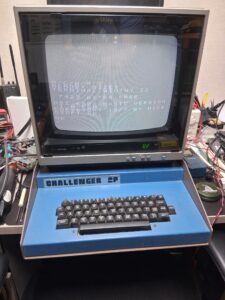
And Ken, known on YouTube as Digital Dorsey, called from Ohio to confirm that the first personal computer Christy ever fought with was in fact broken. That was 50 years ago. Ken still has it. It still boots.

We are often in the studio Saturdays 9 am to 11 am and Sundays 7 pm to 9 pm Pacific. Have your smart phone or speaker remind you to call! Call direct to studio then or anytime at 775-241-3571 and set up a time to battle your tech!
 

“Bitlocker is the gift that keeps on giving even though your don’t want it. ” 

“Make sure, sure, sure, you want your drive encrypted.”

“The key is a huge, jaw-breaking line numbers and letters.”

“Microsoft sneaks in and changes settings to be careful.”

“The malware wasn’t the best malware, so it crashed websites instead of stealing them. Maybe good news.” 

“Help forums are no help at all.”

“That’s a nuclear option.” 

“Most important thing: change out the access.”

“Forward it so it doesn’t go into the big dark hole and people get mad at the organization.” 

“Sometimes things are just broken.” 

“A whole 8k of RAM, not meg, not gig, just k.” 

“Sometimes things are just broken.” 

“It should be in a museum by this time.” 

“Have an unencrypted evening.” 

AI assisted to make us sound more human.
 

Battle Born Tech℠,
where the Wi-Fi is strong,
the fonts are good-looking, and the passwords are above average.

Christy’s first Tech Battle field 

BATTLE PLANS
with help from Claude.ai


Device Encryption Key

Anthony recommends getting the bitlocker recovery key with bcd command line utility:

manage-bde -protectors -get C:

WordPress Recovery Mode

Recovery Mode is a built-in WordPress feature that helps you regain access to your site when a fatal error occurs. (WordPress.org)

Compliance Archving 

“If you are archiving because SEC 17a-4, FINRA, HIPAA, or a legal hold requires it, none of the tools here qualify. A compliance archive enforces retention, tamper-evident storage, supervised review, and defensible export — buy Global Relay, Smarsh, Mimecast Cloud Archive, Proofpoint Enterprise Archive, or Microsoft Purview instead, and involve counsel. ” AI Emaily site

BitLocker / Device encryption

If Windows scrambles everything on the hard drive so it is unreadable without a key.

Encryption at rest

Data scrambled while it sits on the drive, as opposed to while it travels over the internet. A stolen laptop with encryption at rest is a brick to the thief.

ROM

Read-only memory. Permanent chips that hold a program the computer can’t change, like the BASIC in Ken’s Ohio Scientific.

Alpha

The earliest public test version of software. Expect missing features and crashes.

FTP

File Transfer Protocol. An old, direct way to move files to and from a web server, useful when the website itself won’t load..

Open Source

Software whose code is public and free to use, change, and share.

BASIC

 A beginner’s programming language that shipped on nearly every early home computer.  Beginner’s All-purpose Symbolic Instruction Code

Cassette port

Early home computers saved programs as audio on ordinary cassette tapes. Slow, flaky, and the reason you saved every three minutes.

K, meg, gig

Kilobyte, megabyte, gigabyte. About a thousand, a million, and a billion bytes. Ken’s computer had 8 kilobytes. A modern phone photo is about 500 times bigger.

Model Collapse

 What happens when an AI is trained on its own output and gets dumber. Mentioned in the outro as a joke about the outro.


CALL US 

Saturday 9 am – 11 am Pacific
Sunday 7 pm – 9 pm Pacific

775-241-3571

Click for More Info


Letters KNVC 95.1 FM Logo


Breakmaster Cylinder composed and performs our theme music.



Carson City Linux User Group – Meeting third Saturdays at ComputerCorps in Carson City – carsoncitylinux.org 


One on One Tech Help at the Carson City Library Wednesdays 3-4 pm Techbusters
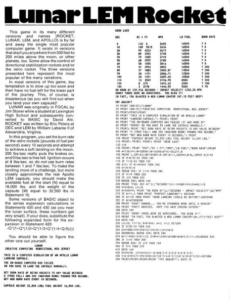
https://archive.org/details/ahl-1978-basic-computer-games/page/106/mode/2up

We are often in the studio Saturdays 9 am to 11 am and Sundays 7 pm to 9 pm Pacific. Have your smart phone or speaker remind you to call! Call direct to studio then or anytime at 775-241-3571 and set up a time to battle your tech!

Tuesdays 8 PM Pacific 95.1 FM Carson City, Nevada

Streaming at KNVC.ORG

Battle Born Tech℠ is a
Registered
Service Mark of Christy Ramsey

775-241-3571 or [email protected]

Battle Born Tech
Battle Born Tech
Ready, Set, STOP
Loading
/

Ready, Set, STOP

This week on Battle Born Tech℠ we welcome Steve, Teresa, and Josh.

Steve has a 15-year-old laptop still works. Steve wasn’t going to throw it away. The question was which Linux would still talk to it, and why one installer built him a house while the other only moved the furniture.

Steve, actually USB Wifi add-on is a good solution to getting WiFi networking to an old Linux box. 

Teresa has a sound bar that lights up. It just wouldn’t make a sound. The problem wasn’t the sound bar.

Every program on Josh’s computer remembers “don’t print on both sides.” Except the one that prints his checks. The fix was not where he’d been looking.

News: Windows 10 gets another year, of Extended SECURITY updates, data centers become war targets of drones, and French supermarkets learn what happens when the freezer takes orders from the internet.

EUBANK RULE: If a competent programmer cannot find the bug, the programmer is looking in the wrong place.

We are often in the studio Saturdays 9 am to 11 am and Sundays 7 pm to 9 pm Pacific. Have your smart phone or speaker remind you to call! Call direct to studio then or anytime at 775-241-3571 and set up a time to battle your tech!
 

“It’s a bridge, not a destination.” 

“Puppy’s installer is a mover, not a builder. It carries the files in, but expects the house already to be standing.”

“Back in the bad old days of Linux, touchpads and Wi-Fi were the first to go.”

“We salute the refurbishers, the hobbyists, and the tinkerers who keep old technology going.”

“Those USB ports on the monitor are just decorative unless you plug the monitor into the computer.” 

“It’s like plugging everything into the power strip, but you never plugged the power strip into the wall.”

“There are a lot of ways for sound NOT to come out of your computer.” 

“You’ve been fixing it in Windows. That’s a post-fix. The break is inside the program.”

“If a competent user cannot fix a problem, the user is looking in the wrong place.” 

“The internet was designed to survive a nuclear war. It heals itself by design. Unfortunately.”

“I wonder how long the internet would go on talking to itself if all the people suddenly disappeared.” 

“This call is going to cost you money, because now you have to print checks.”

“Everybody’s messing with the printer settings, not just the printer.” 

AI assisted to make us sound more human.
 

Battle Born Tech℠,
where the Wi-Fi is strong,
the fonts are good-looking, and the passwords are above average.

Printer Setup 

A program’s own printing preferences, which can override what you set in Windows every time it prints.

22H2 

The final version of Windows 10. Required for ESU. Type winver to check.

Data Center

A building full of computers that run online services. Yandex is Russia’s rough equivalent of Google.

VBScript

Short for Visual Basic Scripting Edition, a simple programming language Microsoft introduced in 1996 for small automation jobs: login scripts, installers, and the little .vbs files that did chores behind the scenes in Windows. Phasing out next year.

BATTLE PLANS
with help from Claude.ai


32 bit 

An older style of computer processor and software. Most new software is 64-bit only, so a 32-bit machine needs a system built for it.

Atom N270

A low-power Intel processor from about 2008, common in netbooks. Tops out at 2 GB of memory.

antiX 

A small Linux system built for old computers, still offered in 32-bit. Its installer prepares the drive for you.

Puppy Linux (BionicPup32) 

A tiny Linux that loads entirely into memory from a USB stick. Fast, but its installer expects the drive to be prepared first.

Frugal install 

Runs in RAM memory. The system copies its files into memory at startup instead of running from the hard drive. Turn off the system, and it’s gone.

Partition 

A labeled section of a storage drive. A drive with no partition is like a lot with no building on it.

GParted

The Linux tool for creating and resizing partitions. 

EXT4 

Fourth Extended File System, a journaling file system for Linux. The standard Linux file system format for a partition.

Publisher 

Microsoft’s desktop publishing program for flyers, newsletters, and church bulletins, part of Office since 1991. Microsoft announced the retirement in February 2024. Microsoft 365 subscribers lose access on October 1, 2026, and support for the standalone Office 2021 version ends October 13, 2026.

Magic Pointer 

The AI-powered mouse cursor on Googlebook, Google’s new line of laptops that is replacing the Chromebook. Point at or circle something on the screen (an email, a date, a picture, a block of text) and Gemini, Google’s AI assistant, offers suggestions such as explaining it, rewriting it, or searching for it.

0xDEADBEEF 

A hex value set by programmers to indicate an error.

Driver

The small piece of software that lets the operating system talk to a piece of hardware. On old Linux, Wi-Fi and touchpad drivers are the usual casualties.

Ethernet 

The wired network connection. Almost always works when Wi-Fi doesn’t.

USB upstream 

The cable with a flat rectangular USB-A end and a squarish USB-B end. It connects a monitor’s USB ports back to the computer. Without it, those ports give power but no data.

Duplex printing 

Printing on both sides of the sheet. Good for reports, bad for checks.

Bot Check 

Automated requests from programs rather than people. Includes search crawlers as well as the bad kind.

Claude HR complaints

On October 8, 2026 Anthropic added a prohibition on sustained and needless abusive or cruel behavior toward Claude models.


CALL US 

Saturday 9 am – 11 am Pacific
Sunday 7 pm – 9 pm Pacific

775-241-3571

Click for More Info


Letters KNVC 95.1 FM Logo


Breakmaster Cylinder composed and performs our theme music.



Carson City Linux User Group – Meeting third Saturdays at ComputerCorps in Carson City – carsoncitylinux.org 

 

One on One Tech Help at the Carson City Library Wednesdays 3-4 pm Techbusters
 

ESU 

(Extended Security Updates): Microsoft’s program that keeps sending security fixes to Windows 10 after regular support ended. Security fixes only, no new features. Now runs through October 12, 2027.

Data Center

A building full of computers that run online services. Yandex is Russia’s rough equivalent of Google.

Connection Controls

Equipment, like supermarket refrigeration, that can be adjusted over the internet. Convenient for the repair company, and for anyone else who gets in. On-prem are on premises not connected to the internet.

We are often in the studio Saturdays 9 am to 11 am and Sundays 7 pm to 9 pm Pacific. Have your smart phone or speaker remind you to call! Call direct to studio then or anytime at 775-241-3571 and set up a time to battle your tech!

Tuesdays 8 PM Pacific 95.1 FM Carson City, Nevada

Streaming at KNVC.ORG

Battle Born Tech℠ is a
Registered
Service Mark of Christy Ramsey

775-241-3571 or [email protected]

Battle Born Tech
Battle Born Tech
Another License? You've Got to Be Kidding Me!
Loading
/

Another License? You’ve Got to Be Kidding Me!

This week on Battle Born Tech℠ we welcome Jay and Rebecca. Jay reassures folks who are moving to Linux. 

A correction for our listeners in Carson City and, apparently, Cardiff: Our Domino’s warning came from across the pond, where some UK customers’ accounts were opened with passwords reused from other sites. That pizza was a bit farther from the oven than we let on, but the lesson delivers anywhere: one password per account.

Rebecca just wanted the hymn words on the screen to match the hymnal. Then she learned there’s a license for the words, another for Zoom, and another for movie clips. Jay, a retired engineer, tells how his company left Microsoft for Linux and watched its trouble calls fall. And Christy and Joe sort out drivers: when to leave them alone, where to get them when you can’t, and why there are two programs named Snappy.

We are often in the studio Saturdays 9 am to 11 am and Sundays 7 pm to 9 pm Pacific. Have your smart phone or speaker remind you to call! Call direct to studio then or anytime at 775-241-3571 and set up a time to battle your tech! 

“Hair on Fire All the Time.” 

“Hallucinations are a real thing.”

“Surviving? It sounds like its thriving!”

“Updates are always a pain”

“Touch and managed by people who had no clue.” 

“If your computer anit broke don’t fix it.”

“I’m not a lawyer.” 

“No COM for us”

“If it’s working, leave it alone.” 

AI assisted to make us sound more human.

Drivers: if it works,
leave it alone 

  1. If it’s working, leave it alone.
  2. Always make a restore point first. 
  3. Never install drivers just because they’re newer.

When you really do need a driver, such as after a fresh Windows install:

  1. Windows Update. It handles most hardware.
  2. Your computer maker’s support site.
  3. For graphics, the chip maker: Nvidia, AMD, or Intel.

Still stuck? Christy trusts one free tool: Snappy Driver Installer Origin. There are two Snappys. In 2017, after Snappy changed hands and began bundling adware, Glenn Delahoy split off a clean, open source version and called it Origin.

BATTLE PLANS
with help from Claude.ai


Restore Point

A snapshot of your Windows system settings you can roll back to if a change goes wrong. Type “restore point” in the Windows search box, open Create a restore point, select your C: drive, and click Create.

Drivers

A small program that teaches Windows how to talk to a piece of hardware, like a printer, sound chip, or graphics card. A wrong driver can silence your speakers or blank your screen.

Adware 

Software that sneaks ads, pop-ups, or extra programs onto your computer, often bundled with something free.

Fork 

When programmers copy an open source project and take it in a new direction under a new name. Snappy Driver Installer Origin is a fork.

Open Source 

Software whose underlying code is public, so anyone can inspect it, fix it, or build on it.

Linux 

A free, open source family of operating systems, the main program that runs a computer, used in place of Windows or macOS.

Extended Security Update (ESU) 

A free, open source family of operating systems, the main program that runs a computer, used in place of Windows or macOS.

Public Domain 

Creative work no longer protected by copyright, free for anyone to copy and use.

Bug Bounty 

A reward program that pays outside researchers for finding and reporting security flaws.

Phishing 

Fake emails, texts, or websites that pose as a company you trust to get you to click, log in, or pay.

Battle Born Tech℠,
where the Wi-Fi is strong, the fonts are good-looking, and the passwords are above average.


CALL US 

Saturday 9 am – 11 am Pacific
Sunday 7 pm – 9 pm Pacific

775-241-3571

Click for More Info


Letters KNVC 95.1 FM Logo


Breakmaster Cylinder composed and performs our theme music.


Carson City Linux User Group – Meeting third Saturdays at ComputerCorps in Carson City – carsoncitylinux.org 


One on One Tech Help at the Carson City Library Wednesdays 3-4 pm Techbusters
 

We are often in the studio Saturdays 9 am to 11 am and Sundays 7 pm to 9 pm Pacific. Have your smart phone or speaker remind you to call! Call direct to studio then or anytime at 775-241-3571 and set up a time to battle your tech!

Tuesdays 8 PM Pacific 95.1 FM Carson City, Nevada

Streaming at KNVC.ORG

Battle Born Tech℠ is a
Registered
Service Mark of Christy Ramsey

775-241-3571 or [email protected]

Battle Born Tech
Battle Born Tech
It's All Plugged In. Why Won't It Work?
Loading
/

It’s All Plugged In. Why Won’t It Work?

This week on Battle Born Tech we welcome Stevan replacing an antique modem, Rachel with a blank projector screen, and Jay has a case of the Double-Ds.

Along the way we cover:

  • when a router is worth replacing, and why a 12-year-old modem earns a plaque
  • why a cable beats Wi-Fi for video calls
  • the Windows key + P shortcut every teacher should know
  • where Windows sends your sound
  • why File Explorer lists a removable drive twice on purpose
  • corrections from last week
  • a new phone app that alerts you when camera glasses are nearby

We are often in the studio Saturdays 9 am to 11 am and Sundays 7 pm to 9 pm Pacific. Have your smart phone or speaker remind you to call! Call direct to studio then or anytime at 775-241-3571 and set up a time to battle your tech!
 

“If they do 5 (years) they come out and give you an award” 

“I have no control what mischief they were getting up to on the other end.”

“If you get three years out of a router, you’re doing well”

“If you are a handy person…or you know someone you should go wired.”

“12 years is a long time in computer years” 

“Sorry kids, you have your lesson today.”

“It’s almost like plumbing.” 

“Where there is no sound…windows ”

“Windows has decided for your convenience to list things twice.” 

“It’s the way it is supposed to work.”

“We may not fix things, but you feel a little more comfortable.” 

“Watch out for the Watchers” 

“Not a bug it’s a feature.” 

AI assisted to make us sound more human.
 

Battle Born Tech℠,
where the Wi-Fi is strong,
the fonts are good-looking, and the passwords are above average.

BATTLE PLANS
with help from Claude.ai


Modem (Bridge)

The box where your internet line enters the house and gets translated into the language your computers speak. The name is short for modulator-demodulator. Many provider boxes combine a modem and a router. Bridge mode turns off the router part, so the box only translates and passes the connection to a router you own.

Router

The traffic cop of your home network. It gives each device an address, delivers incoming data to the device that asked for it, and turns away traffic nobody requested.

Switch 

A power strip for network cables. It lets several wired devices share a connection and talk to each other, like a laptop and a printer. The numbered jacks on the back of most home routers are a small built-in switch.

Access Point

The radio part of your network. It turns the wired connection into Wi-Fi, both sending and receiving. Most home routers have one.

Ethernet

Wired networking, and the name of the cable that does it. The plug looks like a chunky phone jack. It’s steadier than Wi-Fi because it doesn’t share the air with the neighbors.

Device Manager

Windows’ list of every piece of hardware in your computer and whether it’s working. Right-click Start to open it. A yellow triangle means trouble. A small down arrow means the device is turned off, and right-clicking lets you enable it.

ISP

Internet Service Provider, the company you pay for internet. When the box is theirs, so is the repair call.

Win+P

Hold the Windows key and tap P to choose where your picture goes. The four choices are PC screen only, Duplicate, Extend, and Second screen only. On a Mac, open System Settings, choose Displays, or Control Center → Screen Mirroring, 


CALL US 

Saturday 9 am – 11 am Pacific
Sunday 7 pm – 9 pm Pacific

775-241-3571

Click for More Info


Letters KNVC 95.1 FM Logo


Breakmaster Cylinder composed and performs our theme music.


Carson City Linux User Group – Meeting third Saturdays at ComputerCorps in Carson City – carsoncitylinux.org 


One on One Tech Help at the Carson City Library Wednesdays 3-4 pm Techbusters
 

We are often in the studio Saturdays 9 am to 11 am and Sundays 7 pm to 9 pm Pacific. Have your smart phone or speaker remind you to call! Call direct to studio then or anytime at 775-241-3571 and set up a time to battle your tech!

Tuesdays 8 PM Pacific 95.1 FM Carson City, Nevada

Streaming at KNVC.ORG

Battle Born Tech is a
Registered
Service Mark of Christy Ramsey

775-241-3571 or [email protected]